
EP 8: SKIP A NEW PC: SWITCH TO ZORIN OS INSTEAD
DESCRIPTION
Windows 10 support ended, and Microsoft's answer is hardware requirements that sideline perfectly capable machines. There's a smarter path than buying a new PC: Zorin OS, a Linux desktop built to feel familiar while staying fast and secure on hardware you already own.
I cover what actually changes when Windows support ends, why Zorin's Ubuntu LTS base matters, the Windows like layout, and how the Web Apps feature makes tools like Outlook, Google Docs, and Slack feel native.
Then the honest part: compatibility. Wine handles simple tools fine, but Adobe Creative Cloud, full fat Office, and niche vendor apps are dealbreakers, and gaming still favors Windows for anti cheat titles even with Proton doing heavy lifting.
The plan: test everything from a live USB before touching your disk, use dual boot as a safety net, and for small businesses, keep one or two Windows anchor machines for stubborn line of business software while moving browser centric roles over.
TRANSCRIPT — EP 8
If Windows 10 is the apartment you like, but your landlord just shut off security and maintenance, Zorin OS might be the new place across town with cheaper rent and better locks. The catch is you have to move all your stuff, maybe lose a few weird applications, and learn where all the light switches are. In this episode, we're going to figure out whether that move is actually worth it for you. your older hardware, and yes, even your gaming rig. Welcome back to the Tyler Woodward Project. I'm Tyler, a broadcast engineer by trade, a Linux nerd by choice, and I enjoy the mystifying tech that's supposedly too complicated for everyday people. Today, we're talking about life after
Windows 10. And yeah, I know Windows 10 officially ended support on October 14th, 2025, which means no more free security updates or bug fixes for most people. Microsoft would very much like you to buy or build a Windows 11 capable machine or pay for extended security updates if you're a business. And, well, a lot of people are not thrilled with that plan. At the same time, Zorin OS, this little Linux distro designed to feel familiar to Windows users, just passed a million downloads for Zorin OS 18, with a big chunk of
that coming from ex Windows 10 users. So in this episode, first, I'm going to look at what Zorin OS actually is and how it lines up against Windows 10 and Windows 11 on paper. Second, we're going to walk through some real world style stories, older home laptops, small business desktops, and maybe some of your gaming rigs. Finally, we'll wrap it up with a practical takeaway. How to test drive Zorin safely, what to check before switching, and when you should absolutely keep at least one Windows box alive. Let's start with what changed when Windows 10 ran out of road and why. Well, Zorin OS is suddenly in the spotlight.
Let's get into it. Windows 10's end of support is a security and maintenance problem more than just your PC stops booting kind of problem. Security patches, feature updates and most mainstream support ended back in October of 2025. leaving home users exposed as new vulnerabilities show up over time. There is the extended security updates program, but it's targeted at organizations and cost money per device. Turning Windows 10 into a subscription -flavored product if you want to stay connected, that just doesn't sit
well with me. Combine that with Windows 11's relatively strict CPU and TPM requirements and a lot of perfectly usable machines suddenly look obsolete on paper. We don't need more e -waste out there. Zorin OS is a Linux distribution built on Ubuntu LTS, which means long term security, with version 18 based on specifically Ubuntu 24 .04 and a modern 6 .14 kernel. That means under the hood you get long -term support into 2029, plus up -to -date drivers for relatively new Intel and AMD hardware, Wi -Fi cards, and NVMe SSDs. The headline pitch is simple. Make
your computer better, especially if it's a Windows machine that Microsoft would rather you dump in the trash. The desktop is themed, laid out to look very, very familiar to Windows users, and the Pro Edition even ships with layouts that mimic Windows 10 and Windows 11 more closely. Zorin OS's published requirements are modest, too. A 64 -bit dual -core CPU. Check. Around 2 gigs of RAM. Cool. And roughly 15 to 20 gigs of hard drive space. That doesn't sound too bad, right? Compare that to Windows 11, which wants newer CPUs and TPM 2 .0 and generally feels happier
with 8 gigs or more of RAM and reasonably current GPU for smooth performance. And we know with the RAM prices going up, that's going to be a little harder to come by. 8 gigs for the minimum? Yeah, not so much. So many older Windows 10 boxes, think 8 to 10 year old laptops with spinning disc or even early generation SSDs, Zorin OS will simply feel more responsive for browsing, office work and light media consumption than Windows 10 did at the end of its life. The Linux kernel's improved scheduler and the lighter desktop environment together shave off some of the Windows rot feeling where the OS seems to get slower
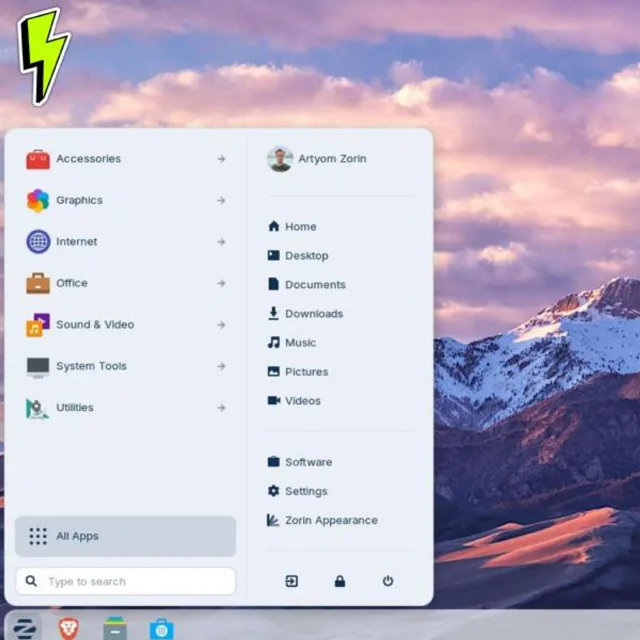
over the years. You know what I'm talking about. Out of the box, Zorin drops you into a menu and taskbar layout that feels like a modernized Windows desktop with a start menu style type launcher in a system tray area. You can switch between different layouts as well. Window -ish, Mac OS -ish, and more traditional Linux, especially in the Pro edition, without reinstalling. You get a software center, that handles app installs with a click to install simplicity, pulling from Ubuntu's repositories. Flatpak and sometimes, yeah, those snap packages do, depending on how you configure it. Browser, email, office suite
and media tools are already out of the box, ready to go. Right there, already pre -installed for you with Firefox or Chromium, LibreOffice and common codecs available or installable. in just a couple of clicks. Zorin OS also pushes a web apps feature where you can turn any website, let's say like Outlook Web or Google Docs or Slack into a pseudo native app with its own icon and window. For a lot of people who live in SaaS tools, it makes the underlying OS matter a whole lot less day to day. Now, Yeah, the big question. Can I just run my Windows applications? Zoron
OS integrates Wine and makes it relatively painless. You know, you double click a executable, it offers to install Windows app support, and then tries to run the installer or program just like it would under Windows. Simple utilities, older apps, and maybe some games will run surprisingly well in this way. But... Anything large, modern and complex like the full fat Microsoft office suite or Adobe's creative suite or any proprietary business apps, you know, probably forget about it because they'll be unreliable or possibly just broken. Maybe you'll get lucky. I don't know. Compatibility depends on Wines implementation, how the app is built and sometimes just really
sheer luck. This is not a drop in replacement story. and people should really plan on that if you're going to switch to Zorin OS. If a radio or TV facility asked whether to move Windows 10 office and edit workstations over to Zorin OS, the first thing that I would check would be what's the anchoring software, broadcast automation, play out systems, and maybe some vendor locked audio tools are often Windows only with zero Linux support. So the decision is usually dictated by the proprietary stack, not by how nice DOS feels. Although I wish that wasn't the case. Because it's based on Ubuntu LTS, Zorin inherits
a known security and update model. Kernel and package updates come via the usual Linux repositories for years, not months. Unlike frozen Windows 10 installs a Zorin machine in 2027, will still be getting current patches or the OS and most bundled software. You also dodged that ad -styled nag that Microsoft has become known for. Windows 11 upgrades are pre -installed suggested apps, which many people find increasingly distracting on Windows. Updates are more under your control and you can delay or stage them without wrestling
with forced reboots in the middle of your workday. Picture a 2014 to let's say 2016 era laptop, dual core CPU, maybe four to eight gigs of RAM, maybe an older SSD or even God forbid is still, you know, one of those spinning hard drives. Windows 11 is off the table immediately. officially, because due to the lack of CPU and TPM requirements that you need. And Windows 10 is out of support unless you pay for the ESU, which home users, they're not going to do that. Drop Zorin OS 18 on that hardware and you get yourself a clean, modern desktop, current browser and up -to -date
office tools without the drag of running an OS that's out of support. and user reports describe these machines feeling like brand new machines, especially when combined with an SSD upgrade if they're still on those older mechanical hard disk drives. For families or individuals doing web surfing, streaming, email, document work, and photo management, Zorin OS is very, very close to a set it and forget it experience once it's installed. The main caveats are Older printers or scanners that only have Windows drivers or some oddball utility like manufacturer backup
tools that don't have Linux versions. Small businesses face a slightly different problem though. Compliance, data security and cost. Running fleets of out of support Windows 10 machines opens you up to all sorts of risk and paying per device for that ESU for years? That's going to add up pretty quickly. Zorin OS can make sense for roles that mostly live in the browser. Accounting platforms, web -based CRM systems, ticketing systems, and email. They all work just fine on a Linux desktop. The Ubuntu Plus Zorin stack is stable enough that you can lock in a base image and not change
much for several years maybe. which simplifies your IT management. The hard blocker is Windows -only line of business apps that require specific versions of Office or integrate tightly with the Windows API. In those cases, you keep a few Windows 11 or ESU protected Windows 10 boxes as a sort of app island, while moving generic roles like reception, web -only work, and basic Office tasks over the XOR and OS. from a cost perspective not having to replace every single computer that fails Windows 11's absurd compatibility check and save a lot of hardware budget over
the next three to five year cycle. It also sidesteps the waste of dumping machines that are perfectly fine for typical office workloads. Let's reduce the e -waste at the same time, you know? Why not? Seems like a no -brainer to me. Gaming is where this whole setup is going to get a little spicier. On the plus side, modern Linux gaming via Steam's Proton compatibility layer and the general maturity of drivers is a vastly better experience than it was even just five years ago. Zorin OS benefits from the same underlying tech as other mainstream distros, recent kernels up to date. Meza and support for AMD and Nvidia
GPUs. With most, if not majority of AAA titles at least functioning through Proton. For single player games and many online titles that played nicely with Proton and Anti -Cheat, you can have a perfectly enjoyable experience on Zorin OS. But for cutting edge AAA titles, Competitive multiplayer with invasive anti -cheat and GPU control panels that expect Windows? Native Windows? Well, that one unfortunately is still going to have the edge over Zorin or any Linux distro. You'll hit the occasional launcher that refuses to run or a game that should work, but breaks after an update until Proton catches up with
it. For serious gamers, the most practical setup is often dual boot, Zorin OS for everyday stuff, like the browsing and maybe work in Windows 11 on a separate partition or a drive dedicated to gaming. That way your gaming performance and compatibility stays high but your main OS isn't chained to Windows 11's hardware requirements or Windows 10's end -of -life support. Zorin OS 18 racking up over a million downloads in a short window is not just a vanity statistic. It signals that non -trivial number of Windows 10 users are actively choosing Linux over Microsoft.
Reports suggest several hundred thousand of those downloads were specifically from Windows 10 users looking for an alternative around the end of support dates. That doesn't prove Zorin is perfect, but it does tell you that you're not alone if you're thinking, well... Maybe I don't want to follow Microsoft to Windows 11 on these terms. It also means that their community and the ecosystem are likely to keep growing, which helps with documentation, troubleshooting, and third -party attention. Here's the low -risk way to kick the tires, if you will, of Zorin OS without nuking
your Windows install. First, download the Zorin OS ISO from the official website and create a bootable USB using a tool like Rufus on Windows. Then, boot your machine from that USB and choose Try Zorin OS option. It'll run live. It'll run in a live session from the USB stick without touching your disk. And in that live environment, you can check Is your Wi -Fi and Ethernet compatible? Do they work? Do they connect reliably? Your display. Are the native resolutions and multiple monitors detected? Can you adjust things? Can you move it? Can you get the refresh rates that you want? And another one is audio. Do your speakers,
your headphones and microphones, do they all show up and work? Peripherals like your printers, your scanners, your webcams and any odd controllers. Test them all. Make sure they work. If everything looks good and you want to proceed to install Zorin either as the only OS or alongside Windows in a dual boot configuration, you can do it as long as you've backed up your data first. We'll talk about that in a different episode. The installer will generally detect Windows and offer the option to install alongside your Windows partition. But it's still worth double -checking the partition layout before you click OK Because if you do anything wrong, it'll nuke it it'll happily override
it but a lot of these newer installers on Linux will Warn you at least once or twice before it'll proceed writing over any important data. So make sure you read the prompts Clearly and understand what you're doing before you hit apply go. Okay, whatever whatever an option comes up, you know Zorin OS It's a strong candidate if Your main workloads are more web -based email office docs and media your hardware is Blocked from Windows 11, but still fast enough especially with an SSD and you're willing to learn a slightly different way to install apps and manage updates I mean if you've ever transferred from Mac to Windows or Windows to Mac you had to learn new things
Anyways, this is no different. It's also You know, appealing if you're tired of ads, prompts, and nag screens on Windows and you want a quieter, more controlled environment. That's what I like about it. For small businesses that mostly live in web browsers, it can extend a usable life of a PC by several years while staying on a supported, patched platform. You should absolutely keep at least one Windows box around if you rely on Windows only professional apps. We're talking about the Adobe CC full Microsoft Office integration or niche vendor software that doesn't support Linux yet. Maybe another reason is you're a competitive
gamer and need the maximum compatibility with anti -cheat and new titles on day one or your organization is tied to Windows. Windows -centric management tools like group policy or specific security agents. In those cases, consider dual boot or offloading some roles to Zorin while keeping Windows as the anchor OS for critical workloads. Think of Zorin as a way to reclaim older hardware and reduce your Windows surface area, not necessarily eliminate it overnight. If you're on Windows 10 today, ask three questions.
Number one, does the machine need specific Windows only software or is it mostly browser and basic tools? Number two, am I okay learning a slightly different OS if it buys me more years of updates on my current hardware? And number three, do I have a plan for gaming or specialized workflows, dual boot, an anchor machine or cloud access. If the answers line up in favor of flexibility and browser -centric work, Zorin is a genuinely solid next step for you. If you're deeply embedded in Windows -only ecosystems or eSport trade gaming, you might treat Zorin as a secondary OS, rather
than making it your primary. Is Zorin OS the new apartment for Windows 10 users? For a lot of machines? And a lot of people? I think the answer is yes. As long as you're honest about what you actually want to run and what you're willing to adapt to. That Windows 10 notice might feel like the end of the road. But it's really just Microsoft's end of the road. Zorin OS gives you another path forward. Keep your hardware, stay supported, and reduce the amount of windows you have to manage day to day. If you spin up a live USB and try this, treat it like a lab.
Poke at your apps, test your peripherals, your keyboards, your mouse, your webcams, all that stuff, and see whether the friction points are tolerable for you. The difference between a great migration and a frustrating one is usually just expectations. preparation. If this episode helped you think differently about your post Windows 10 options, there's more like this on the way. Visit TylerWoodward .me, follow at TylerWoodward .me on Instagram and threads, subscribe and like the show on your favorite podcast platform. I'll catch you next week.